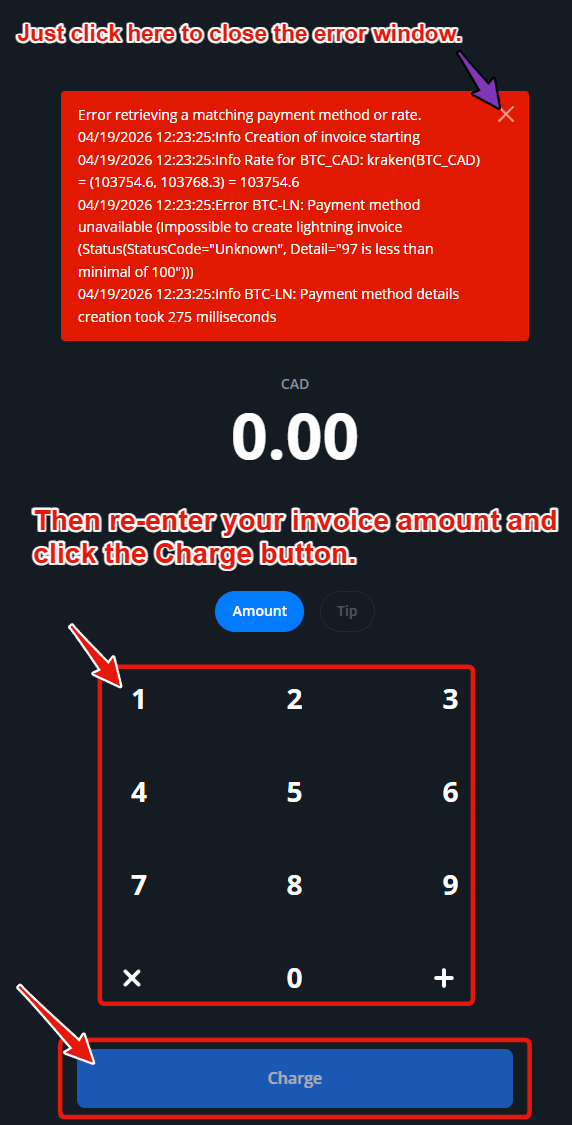
If you ever see a red error message pop up at the top of the Point of Sale screen after you type in an amount and click the Charge button, please do not worry.
This is a rare non-critical issue involving the backend Boltz service, and it basically means the Boltz service did not generate a swap as quickly as it should.
This issue will only happen before an invoice is generated. Which means you'll just need to re-type the amount you want to charge the customer.
We're working on a more graceful way to handle this error in the future. Thank you for your patience.
For now, if you see this error message please just click the x in the red window and then re-type your invoice amount and then click Charge as you would normally.
Your QR Code Invoice will then appear and be ready for use by the customer.
Was this article helpful?
That’s Great!
Thank you for your feedback
Sorry! We couldn't be helpful
Thank you for your feedback
Feedback sent
We appreciate your effort and will try to fix the article